
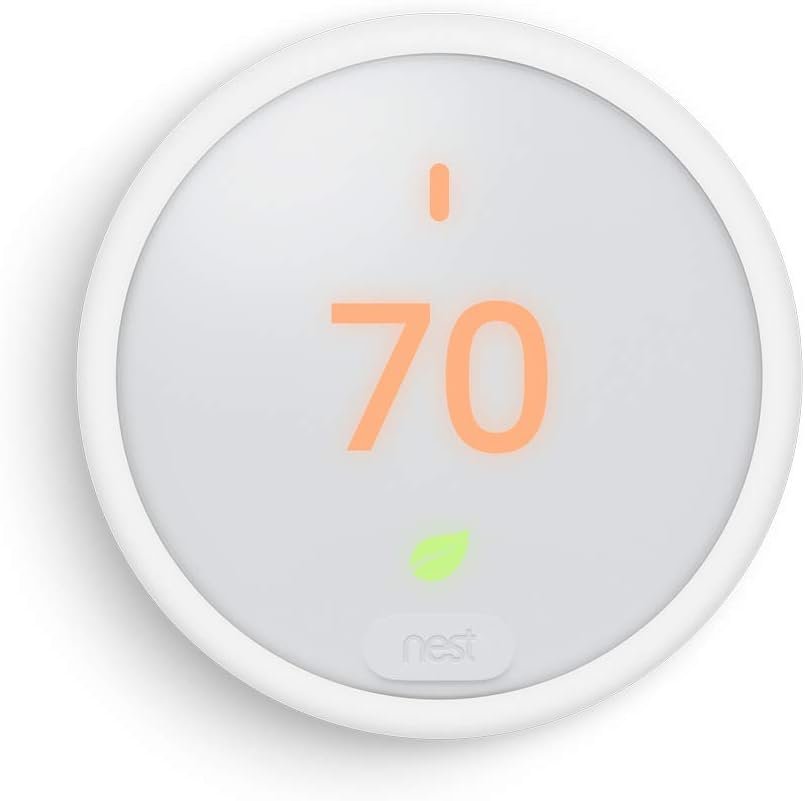
Nest Thermostat E Programmable Smart Thermostat for Home, App Controlled via Wifi, Programmable, Compatible with Alexa and Google Assistant, Frosted White Color (T4002ES)
$89.99
Related Products


The Product
The Nest E Pro from Google is an affordable smart thermostat that learns your heating and cooling preferences to optimize your comfort needs. This adds up to substantial savings on your monthly energy bill. Control it from any location with the Nest app on your smartphone, tablet or PC.
Energy Savings
Nest is the first thermostat to be ENERGY STAR certified by the EPA. Customers saved an average of 10% to 12% on heating bills and 15% on cooling bills, according to several years of study. Check your energy history within the Nest app to see how much you’re saving and ways to save more. The Nest Leaf appears on the display when the temperature is set at an energy-saving level.
Smart Features
The Nest thermostat controls temperature automatically by learning your habits, then programming itself to suit your lifestyle. Use it like you would a regular thermostat for a week by adjusting the temperature as normal. After several days, Nest will program itself to keep your home comfortable based on your schedule. It automatically turns down when you’re away from the house by using your phone’s location. Additionally, you can lock your thermostat to prevent adjustment unless the user can enter a short, chosen code.
Updated Design
The Nest E Pro features a subtler design and a lightweight polycarbonate build. The frosted display blends in with light colored walls and wall coverings. It is easily controlled with a spin dial that wraps around the device.
CONTROL FROM ANYWHERE: With the nest, you’re able to make changes to the current temperature, wherever this unit is attached, with your laptop, phone or tablet. In addition to this, you are able to utilize voice commands by home assistant, allowing you to command this unit hands-free.
EASY TO INSTALL: This unit is designed to install where needed in 60 minutes or less. This smart thermostat quickly and easily replaces your previous unit. You have two options for installation: place it on the optional stand (sold separately) or install it on the wall in place of your old thermostat.
SCHEDULE YOUR TEMPERATURE: With the app, you are easily able to set a scheduled time for temperature adjustment in the household. Whether you tune it for maximum comfort or variable temperatures to help with energy usage, you’ll always have complete control. The choice and customizability is yours to maintain for your own household.
WIDE RANGE COMPATIBILITY: The Nest Thermostat E works with most of 24V heating and cooling systems, including gas, electric, forced air, heat pump, radiant, oil, hot water, solar and geothermal. This unit is designed to work even if your home has a C-wire, but you may have to install a new one. If you’re unsure of how to setup a C-wire, we recommend reaching out to a Nest pro in your area.
SUBTLE AND SIMPLE: The Nest E is designed to blend in with its surroundings and not interrupt the creative design of your household, especially with lightly colored walls. The unit also features manual controls via the front of the device, with a simplistic spin dial. Create and embrace ease and comfort with the Google Nest.
9 reviews for Nest Thermostat E Programmable Smart Thermostat for Home, App Controlled via Wifi, Programmable, Compatible with Alexa and Google Assistant, Frosted White Color (T4002ES)
Add a review

$89.99
J –
Great price and perfect for heating only system.
I bought this because I have 5 zones and 3 of the zones are for heating only. The Nest E Thermostat works perfectly and I don’t have to worry about the “C” wire or RC wire. Easy to install and easy to set up with the Google app and the Nest app.
MarCole –
Wish it came charged; would have saved a headache
I thought I bought a dud of a thermostat. I connected it thinking I would have no problems. Nothing…I didn’t realize I had to charge it before using it. It wouldn’t connect, wouldn’t turn on to let me know it was dead; I just had a black screen. I had to look up why it wasn’t working, thinking it might not be compatible. It was since I went from NEST thermostat to NEST thermostat e. I put it on an old phone charger and had to let it charge for a few hours before trying again. Once I installed it again, set up was easy. I’m no technician, but after it was charged I felt like I could take on any electrical device in the home. Thermostat is connected and working properly. Now I can lock my thermostat and keep it locked from my hot-blooded husband.
Nico –
Worst design ever!
I hate it. It’s terrible.1st Why is the temperature gage that shows you the temp in the room, super tiny? You have to lean your face a foot from the controller to see it. The big number, that you can see from across the room, that’s the setting. Well I know my setting. I’m the one who set it. What I don’t know is the temperature in the room. That should be the big number. Unreal lack or logic.2st But wait it’s worse. That fuzzy image that you see, it’s the exact same in real life. Why? It makes me feel like I need glasses. Why isn’t’ it clear and crisp? Unreal lack of common sense and logic.3rd The settings, the programing is so complicated you need a PHD in Computer Science to figure it out. And if you don’t do it in the exact correct sequence, it just resets on it’s own.4th But wait it’s worse. It completely ignores your settings, anyway. If you set it to 70 but you’re working the next room and it doesn’t sense you walking by, it will completely ignore the setting and let the temperature rise to 80. So you have to walk by it every half hour or it will not cool your home, and there is no way to change that.5th If you download the app, it then wants all your personal information, NOT for your benefit but to sell your data online. It pretends in the terms of service not to do that, with confusing legal lingo, but that’s what it does. That’s how they make their money. Just another data collecting scheme.Stay away from it.
RICHARD VARGAS –
Great ac thermostat good value
Great product works like a charmEady to use and set up
Teju –
Works great with 2-wire heat only Top-Vent Gravity Wall Furnace
If you have a 2-wire system that’s heat or cool only, this thermostat will work for you. It will work a system is a millivolt or 24V system.For a millivolt furnace like the Williams Top-Vent Gravity Wall Furnace, you’ll need a 24V transformer to act a C wire to provide power to the thermostat. You can search for transformers that work with Nest on Amazon. One such example is the Viivria AC 24 Volt Transformer. Once you have your transformer,1. Connect the one end of the transformer wire and the red R-wire for your heat/cool to the ‘R’ terminal.2. Connect the other end of the transformer to the ‘C’ terminal.3. Connect your other wire (likely white) to the ‘W’ terminal.4. Put the thermostat back on its base.4. Plug in the transformer.This configuration should keep your thermostat powered. I’ve had this configuration for 2 months and it works well.
Megan Goff –
Not compatible with 2 stage systems
Nest really needs to make their systems compatible with 2 stage systems
Jerry J. –
First one failed second one worked great
I bought this on recommendation from HVAC tech for my older heater system which uses 24 volts. He came over and made sure the wiring was correct, he had to add two additional wires since old thermostat only used twoFirst one did not work out of the box. Scheduled a return and ordered a second unit and it works great. Very happy with the Nest thermostats. This is my third one. I have one at my home and now my mother in laws for this oneI added one to a mountain cabin as the previous electronic model would reset to a high temp after power outage. Not great during the winter when we are not there. Want to keep it from freezing but not 70 degrees if no one is around.Also I can preheat the cabin to be warm before we arrive.
Peter Artoglou –
Nice
good
Mohamed –
They should inform you that there is some requirement as it not work from the box write away