

Enbrighten White Add-On Switch, QuickFit & SimpleWire, Smart Light Control, Z-Wave/Zigbee Smart Light Switch, Works with Alexa, Google Assistant, Not A Stand Alone Switch, Smart Home Devices, 46200
$17.99
Related Products




Expand your control with the Enbrighten Add-on Switch with Quick Fit and Simple Wire . When paired with an Enbrighten smart switch or dimmer, including Z-Wave and ZigBee controls, the hardwired device completes multi-switch systems. Wirelessly operate and schedule indoor or outdoor fixtures from up to five locations for effortless management of your home.
WHY AN ADD-ON SWITCH – Add-on switches allow Enbrighten in-wall smart controls to operate correctly in multi-switch configurations. By connecting directly to the smart device, the add-on mirrors its functions. This feature allows you to dim lights, adjust fan speeds, turn fixtures ON/OFF and more based on the capabilities of the primary smart device. While the add-on switch is not a stand-alone device, it provides continued use of your favorite smart-device functions from multiple locations.
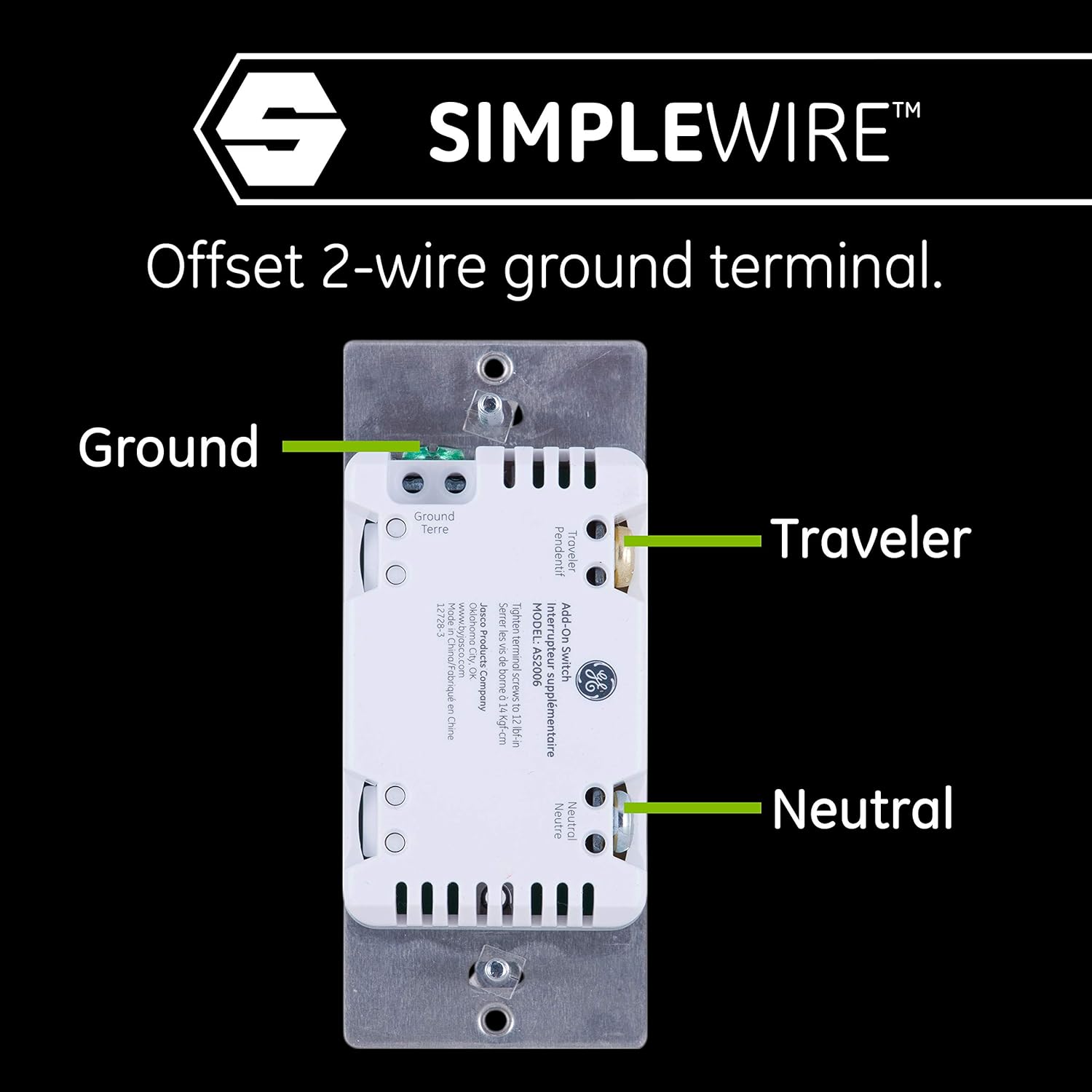
ADVANCED DESIGN 2ND-GENERATION MODEL – Improved components reduced the housing depth by up to 20% compared to previous models and eliminated the need for breakoff tabs. Quick Fit enhancements are the ideal smart solution for older-style switch boxes, multi-gang configurations or any other application with limited space. Dual ground ports, which are offset to avoid switch box mounting screws, support daisy-chaining in multi-switch setups.
ULTIMATE FLEXIBILITY – Compatible with any Enbrighten smart control to operate lights or devices from multiple locations. The add-on switch sends commands to the connected in-wall Z-Wave or Zigbee switch, dimmer or fan control for full use of home automation features in 3-way configurations. For easy installation, the add-on switch only requires neutral, traveler and ground wires. It cannot be used as a standalone switch.
COMMERCIAL AND RESIDENTIAL APPLICATIONS – Supports 120VAC and 277VAC for universal use in a variety of systems. The switch is suitable for use in common home 120VAC or light-commercial 277VAC applications. Must be paired with a 277VAC smart device (model 43074) for light-commercial use. Easily replace any in-wall control in a multi-switch configuration to remotely turn on or off and set programs for a wide range of fixtures.
EASY INSTALLATION – Requires indoor in-wall installation with hardwired connections. NEUTRAL WIRE REQUIRED. Wall plate not included. Works with LED, CFL, incandescent and halogen bulbs as well as other fixtures based on the primary device functionality.
9 reviews for Enbrighten White Add-On Switch, QuickFit & SimpleWire, Smart Light Control, Z-Wave/Zigbee Smart Light Switch, Works with Alexa, Google Assistant, Not A Stand Alone Switch, Smart Home Devices, 46200
Add a review

$17.99
MY Shoppin’ Reviews –
Works great!
These are pretty easily installed by an electrician. The one thing you have to get use to is the switch doesn’t flip all the way up or down. It sort of toggles right in the middle and provides a click feedback. Not as reliable with metal faced switch plates ( the utility kind, so I put in a nightlight device next to it for signal transmission. Still works great.
Debbie Nam –
Simple install and stays connected
Small internal form factor makes the install much cleaner than most switches that have a huge internal housing — particularly in a multi-switch box with lots of wires. Setting it up with my Smartthings hub connected easily and has never disconnected in the 3 months since I installed it (many of the other less expensive devices seem to disconnect at will). Overall a little pricy, but worth it.
D. H. –
Better than the older version
I like the slimmer profile of these new units, it makes installation easier. I do like the led in the switch (even though I have it programmed off.). I have this Z-Wave unit connected via SmartThings. It connects very easily and reliably. Smart things does have control over the led indicator light (blue). So far I have been very happy with my GE Switches. I have 13 installed with only one partial failure. I had one over the older model stick on, after about 6 months of use.
Clara R –
Much better than earlier models
It was quickly discovered by Smart Things and subsequently, Alexa. I have had zero issues since I installed it. This model does not require you know line vs. load. You do need to know common and you need an independent neutral, which is standard for most wall switches. Easy install. The body is smaller than earlier models, so it is easier to fit in the box.
Dennis Bollschweiler –
Easy to install! Just a bit pricey!
I love these! I literally replaced every switch in my house with these. Amazon did mess up and sent me two of the flat switches, but I installed them anyway. My wife likes those flat ones the best, but I prefer these more. They are super easy to install. No issues getting them to connect to my hub. Easy to exclude and include and works with Smarthings. I just wish they didn’t cost so much, but I love them!
Howard –
Z-wave and Ring compatible
I installed a few of these switches to allow my Ring alarm system to turn exterior lights on at dusk and off at dawn. Then when I was in a wheelchair, I installed two more in my bedroom to control the overhead light and fan. I can turn the lights off and on with Akexa, allowing me to get into bed with the lights on and then turn them off verbally. And if I get hot, I can turn the fan on (or off) without getting out of bed. I’m now adding another switch to control the light in the cats’ room because when I travel my cat helper sometimes turns the light off by mistake.
River Otter –
Doesn’t “Really” Work with Ring as Advertised
Does not “really” work with Ring. It says it works with Ring, and Ring says it works with Ring, but all you can do with Ring after it’s connected is turn it on or off through the Ring app – manually. If you want to set a schedule for when the switch turns on and off, like you can with standard Ring lighting, you cannot do that with this GE Smartswitch. If you want it to turn on when your security lighting is triggered, you cannot do that with this switch through Ring. You can only turn on and off manually through the Ring app, for which in most cases it would be simpler just to use your finger on the toggle instead of your smart phone. You can use Alexa to operate this switch, and you can use Alexa to integrate with Ring (or so I have read) but you would also need a zwave hub to talk to this switch. Your Ring base station WILL NOT act as a zwave hub for this switch, except to manually turn it on and off through the Ring app. In my opinion this barely meets the definition of “Works with Ring” and the advertising by both Ring and this switch (but mostly Ring) is disingenuous. The switch could work great for all I know at this point, but I bought it because Ring advertised that it works with Ring, when in fact it really doesn’t. I feel like I have been suckered, and I would spare you the same if I can.
Kev –
Love these switches, easy to install, work great
I’ve noticed other people say that they can’t connect Alexa and that it doesn’t work properly but mine worked perfectly every time, maybe it’s the install… I don’t have to touch any of the light switches that I have these connected to, and I have them on multiple switches throughout my house… Great for anyone that forgets to turn off lights, simply tell Alexa to turn off the lights in the other room, not needed but So very helpful especially when taking care of kids… Very easy to install with a little bit of research and turning off the power to the breaker… One of the coolest features is the blue back light when the items are off, easy to find in the dark too.
Totally original name –
These switches might join using Z-Wave plus encryption, but then quickly fail and default to no encryption.This is a problem because they won’t act as a signal repeater for any device that does use encryption.Also the switches do not support a “long press” through Z-wave.But worse than that!These switches HAVE to be clicked, if you flipped the switch up and held it (expecting the lights to come up) they will completely IGNORE your request. Instantly causing your brain to go UP-DOWN-UP, but unless you ONLY click the switch ONCE in ONE direction, it will still IGNORE your input and not turn on the light. You have to click the switch either up or down, and only do one quick click!(Anyone who isn’t used to these switches struggles with this)